


Meet Sarah, a senior Instructional Designer who recently discovered that asking a generic chatbot to build a curriculum is like asking a golden retriever to build a space shuttle: impressive effort, lots of enthusiasm, but absolutely not flight-ready. Staring down a mountain of Subject Matter Expert (SME) notes and impossible deadlines, she turned to AI hoping for a magic wand. Instead, she got a full-time job as a prompt whisperer. While standard LLMs can vomit out text at warp speed, fast text generation is definitely not sound learning design. This is the hilarious, slightly painful tale of why standard chatbots left Sarah drowning in prompt fatigue, and how switching to a science-backed AI platform restored both her workflow and her sanity.
When Sarah first opened ChatGPT, she felt like a wizard about to cast spells. Can you prompt an AI to respect Bloom's Taxonomy, follow Gagné's 9 Events, and format a clean VILT guide? Technically, yes, if you happen to enjoy crafting 400-word prompt chains and bartering with a chatbot that periodically forgets its own rules. As empirical research on generative AI adoption shows, relying on standard chat tools trapped Sarah in a comedy of errors: an endless cycle of prompt management where she spent more time babysitting the AI than actually designing learning experiences.
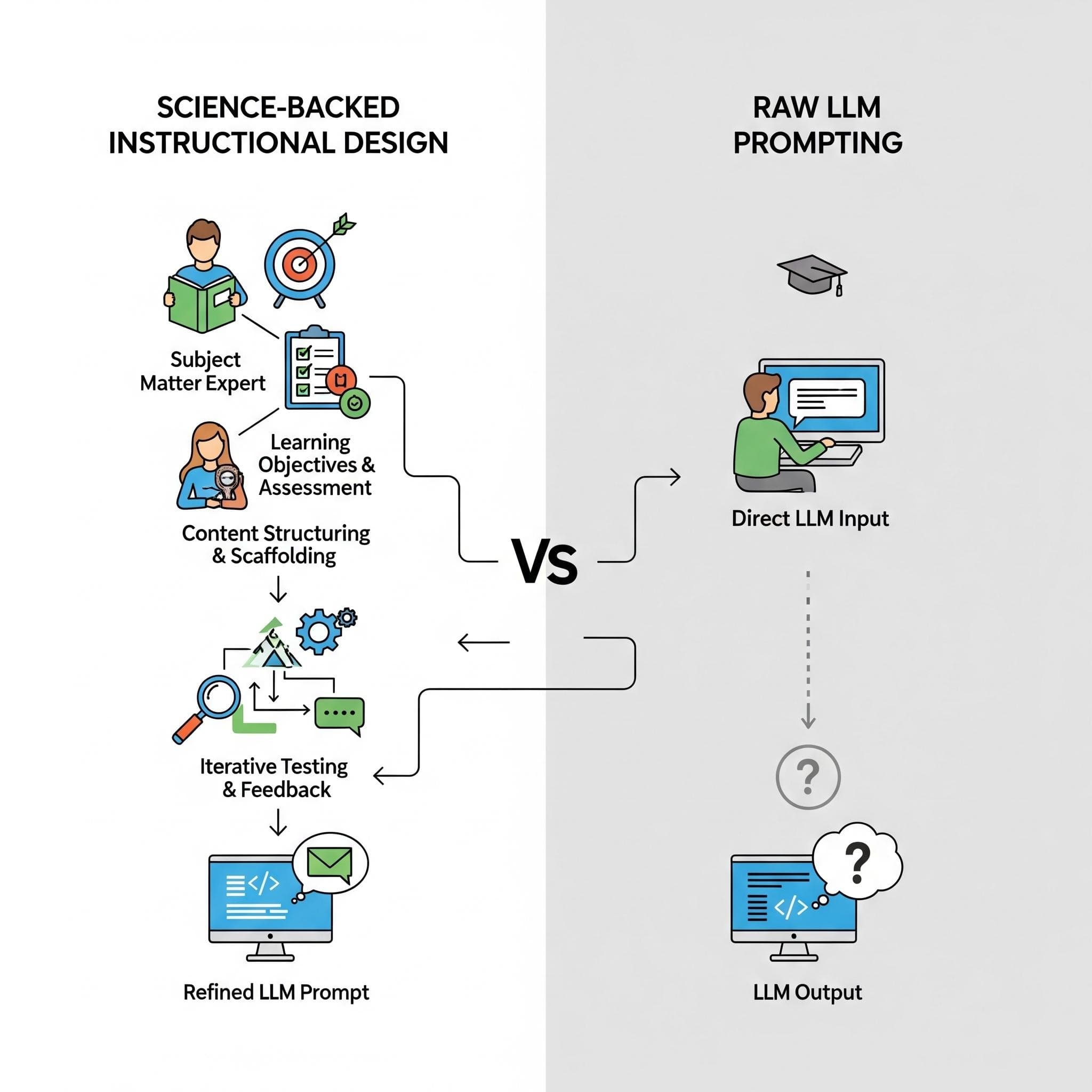
Generic Large Language Models simply predict the next most likely word. Sarah realized she needed software that understood learning science out of the box. Purpose-built platforms like Nuralia.ai embed pedagogical guardrails directly into their architecture, eliminating custom prompting while guaranteeing that every generated asset aligns with how the human brain retains and applies information.
Chapter 1: The struggle with unstructured AI
Early in her wild experiment, Sarah noticed a clear divide. Standard chat tools were like toddlers: bright, fast, but requiring relentless supervision to stay on the path. In contrast, purpose-built AI engines naturally constrain output models using actual cognitive frameworks (like Gagné’s 9 Events of Instruction, Mayer’s Multimedia Principles, and Bloom’s Taxonomy), enforcing these standards automatically so Sarah didn't have to write a novel every time she clicked "generate."
Chapter 2: The four bottlenecks that drained Sarah’s productivity
As Sarah tried scaling course creation across her enterprise team, four major friction points slowed her to a crawl:
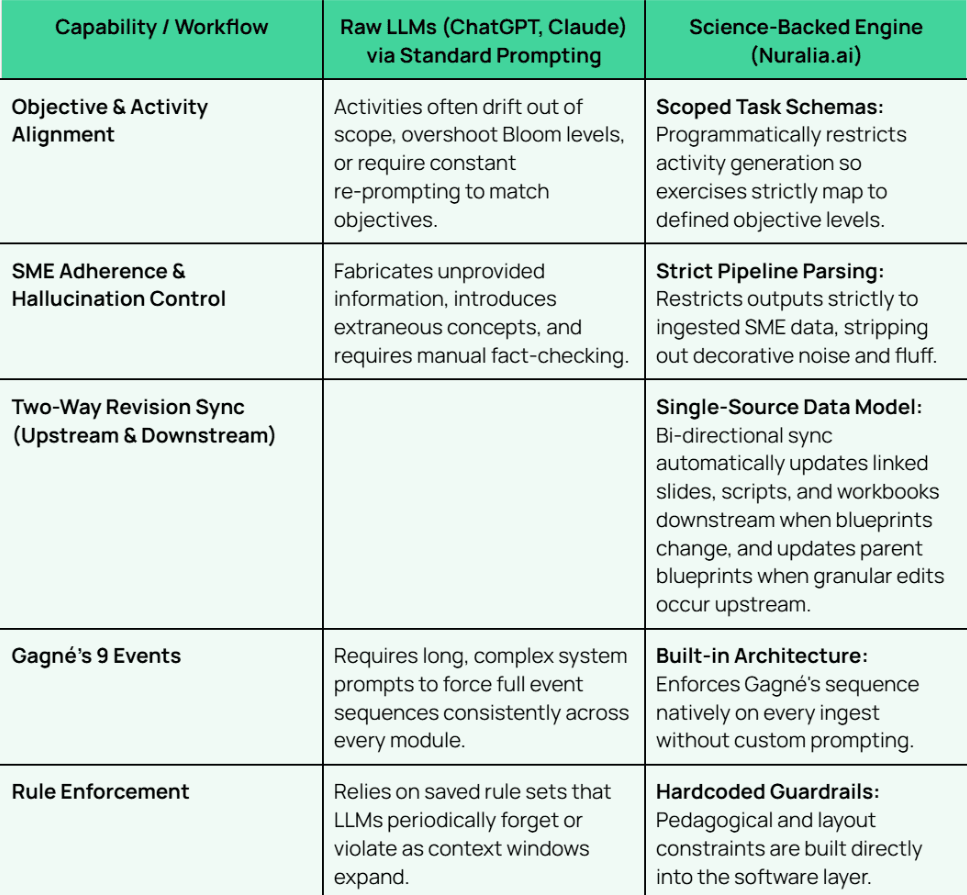
- 1. Activity Misalignment & Scope Drift: The AI frequently generated exercises that drifted away from core learning objectives, adding out-of-scope concepts that induced extraneous cognitive load on learners.
- 2. Prompt Fatigue & Rule-Policing: Sarah spent more time bargaining with broken prompt rules ("No, please stop using bullet points inside table cells!") and re-prompting the AI than actually designing content. Prompt fatigue became her primary cause of afternoon headaches.
- 3. Unprovided Content & Creative Hallucinations: Because generic LLMs prioritize wildly confident prose over actual factual accuracy, Sarah had to play detective, fact-checking every paragraph to catch the AI casually making up industry statistics.
- 4. Broken Two-Way Revisions: Tweaking a single objective in her master document didn't magically update the slides or facilitator notes. Updating a scenario meant manually copy-pasting text across dozens of disconnected files like a human copy machine.
Chapter 3: The turning point, purpose-built AI vs. standard chat
When Sarah finally switched to a purpose-built engine like Nuralia, the dynamic changed instantly from "AI babysitter" to "supercharged instructional architect." Here is how her old chat chaos compared to her shiny new science-backed workflow:
Chapter 4: Automating Gagné’s 9 events in practice
Rather than typing out multi-page system prompts for every new module, Sarah’s new workflow operationalized Gagné’s framework automatically directly from raw SME files:
- Gain Attention & Inform Objectives: Auto-generates real-world scenario hooks paired with measurable Bloom's action verbs.
- Stimulate Prior Recall & Present Content: Primes existing learner knowledge while scaffolding chunked micro-learning modules to protect working memory.
- Guidance & Elicited Performance: Injects explicit facilitator callouts, visual cues, and interactive decision trees directly into the lesson plan.
- Assessment & Retention: Generates scenario-based evaluations tied strictly to objective levels, alongside post-training job aids.
Chapter 5: Reclaiming the role of strategic learning architect
By letting embedded learning science handle the generation details, Sarah transitioned from prompt supervisor back to strategic learning architect in four clear steps:
- Ingest SME Data: Import unstructured interview transcripts, PDFs, or legacy slide decks directly into the engine to turn weeks of front-end analysis into minutes.
- Set Cognitive Depth: Select target outcomes anchored directly to specific Bloom's Taxonomy levels.
- Generate the Blueprint: Produce scaffolded modules complete with timing, interaction triggers, and activities.
- Export Ready-to-Use Assets: Automatically push synchronized deliverables straight into editable presentation slides and detailed VILT facilitator guides.
Frequently asked questions
Why shouldn't enterprise L&D teams rely solely on raw LLM chat interfaces for course creation?
While raw LLMs produce strong text when prompted by experts, relying on chat interfaces leads to prompt fatigue, unaligned activities, unverified content additions, and disconnected files across upstream and downstream revisions.
How does science-backed AI ensure assessment alignment?
Science-backed AI uses structured data schemas that force every generated activity, slide, and assessment item to map directly back to the exact Bloom's Taxonomy level defined in your core learning objective.
How does AI apply Mayer’s Multimedia Principles?
A science-backed engine applies the Segmenting and Coherence principles automatically by stripping out extraneous noise, organizing content into user-paced learning blocks, and pairing facilitator cues directly with visual slide anchors without requiring custom layout prompts.
Evidence & further reading
- Platform Workflows: Learn how Nuralia transitions teams from fragmented workflows to a single design workspace.
- Front-End Analysis: Read how teams turn weeks of front-end analysis into minutes of blueprint generation.
- Customer Case Study: Explore how an L&D manager scaled her impact 8x with Nuralia.
- Luo et al. (2025). Generative AI in Instructional Design: Adoption, Benefits, and Best Practices.
- Panke (2026). Generative AI for Instructional Design: Changes, Chances, Challenges.
- Landon & Kiener (2026). Managing the Load: AI and Cognitive Load in Education.

